Decks
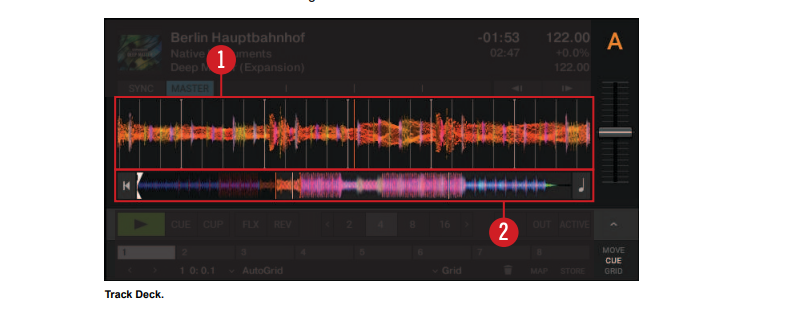
The Track Deck in TRAKTOR is the equivalent to a turntable or a CD player in a classic mixing setup, used to play back conventional tracks. Besides the Common Deck controls, the Track Deck's center contains the following elements:
(1) Waveform display: Visually represents a localized view of the loaded track. The brighter color shade represents higher frequencies, while the darker color shade represents lower frequencies. It also shows the Beatgrid markers, and shows zoom controls when hovering the mouse over the Waveform display.
(2) Stripe view: The Stripe view shows the entire waveform of the track including all Cue Point markers and Loop markers. You can jump back to the start of the track or directly jump within the track by clicking inside the Stripe view. You can also activate Keylock for the track.